Finding the right sign-in page is a small but important part of using any online casino. For UK players looking for moana casino login, the practical questions are straightforward: how to access an account, what to check before depositing, and how to avoid common security and payment problems. This guide explains the process without assuming that every feature, promotion or payment option is available to every visitor.
Casino websites can change their terms, access arrangements and services. Before registering or transferring money, check the current site address, the operator’s legal information and whether the service is authorised to accept customers in Great Britain. A familiar brand name alone is not proof of a licence or of UK availability.
Moana Casino online: what to check before signing in
Search results and adverts can lead to lookalike pages. Use an address supplied by a source you trust, and inspect the browser address bar before entering a password or payment details. A secure connection is useful, but the padlock icon only indicates an encrypted connection; it does not establish that a casino is legitimate or licensed.
UK consumers can check the operator’s status using the public register of the UK Gambling Commission (UKGC). Look for the company name and relevant permissions, not just a logo displayed on the casino page. If the operator is not authorised for the UK market, do not assume that UK consumer protections or complaint routes will apply. Rules may also differ for people in Northern Ireland, so check the relevant local requirements.
How to log in
- Open the verified website. Check the address carefully and avoid links in unexpected messages or social posts.
- Select the sign-in option. It may be labelled “Log in” or “Sign in”, usually near the top of the page.
- Enter your registered details. Use the email address or username associated with your account and the password you created.
- Complete any security check. The site may request an email code or another verification step. Never share a one-time code with someone who contacts you.
- Confirm account status. If access is blocked, read the on-screen notice and contact support through the verified site rather than repeatedly guessing passwords.
If you are using a shared device, do not save your password in the browser. Sign out when finished and close the browser window. On a personal device, a reputable password manager can help create and store a unique password. Avoid reusing credentials from email, banking or social media accounts.
Forgotten password or account access problem
Use the site’s password-reset process and follow the instructions sent to the registered email address. Check spam folders, but do not click a reset link if you did not request it. If you no longer control the email address or cannot complete verification, contact the operator’s support team using contact details shown on the verified website. Be prepared to provide information needed to establish ownership, but do not send full card details or passwords.
Repeated login attempts may trigger a temporary security lock. Wait for the stated period or ask support how to proceed. Do not create a second account to get around a restriction: duplicate accounts can breach terms and complicate balances, identity checks and withdrawals.
Creating an account and completing checks
New customers may be asked to provide their name, date of birth, address, email and telephone number. Enter accurate information that matches your identity documents. UK-licensed gambling operators have obligations around age, identity and customer verification. Checks can happen at registration or later, including before a withdrawal, so keep relevant documents available and submit them only through a secure, official channel.
Do not register if you are under 18. If the operator cannot confirm your details, the account may be restricted while checks are completed. Ask support what documents are accepted and whether an image needs to show all corners, be in date or include a particular page. Never alter a document to make it appear to meet a requirement.
Depositing safely from the UK
After logging in, open the cashier or payments area and review the methods displayed for your account. Availability can depend on the operator, your location, account status and payment provider. Do not rely on an old list of accepted methods. Check the minimum and maximum deposit, any processing time, currency conversion costs, and whether the method can also be used for withdrawals.
- Choose a payment option shown in the account cashier.
- Enter an amount that fits your pre-set entertainment budget.
- Check the currency and any charges before confirming.
- Complete the bank, card or e-wallet authorisation on the provider’s secure page.
- Return to the casino account and confirm that the balance has updated.
Use a payment method in your own name. A deposit that fails may still appear as pending with a bank or payment service; check the transaction status before trying again to avoid duplicate requests. If money leaves your account but does not arrive at the casino, save the transaction reference and contact the payment provider and the casino through their official support channels.
Deposits, withdrawals and bonus terms
A displayed deposit method does not guarantee that withdrawals will be processed through the same route. Operators may require withdrawals to return to the original payment method where possible, or may offer an alternative after verification. Review the cashier information and withdrawal terms before depositing, including expected processing times, fees and any limits.
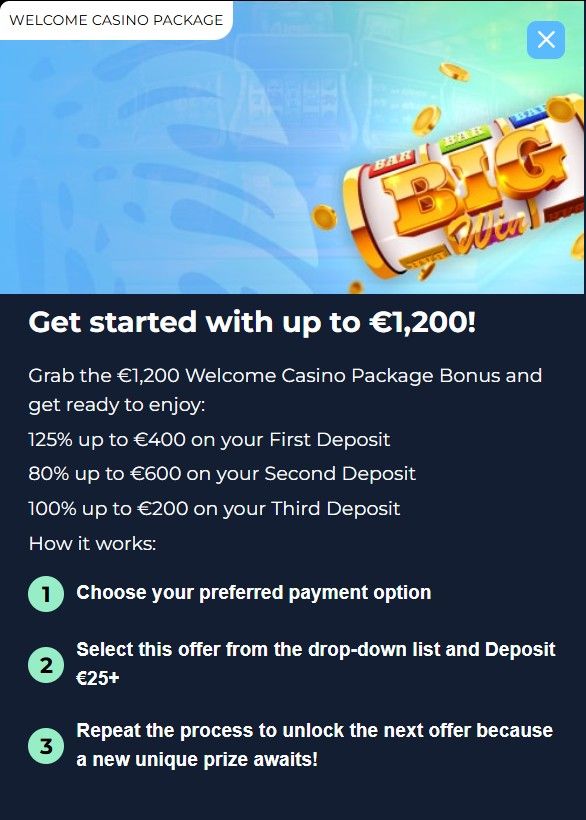
If a welcome offer is available, read its full terms before opting in. Pay attention to wagering requirements, eligible games, maximum bet rules, expiry dates and withdrawal restrictions. A bonus is not the same as cash and can affect how and when funds may be withdrawn. If the conditions are unclear, ask support for an explanation before accepting the offer;
Account security and responsible gambling
Protect your account with a unique password and any additional security options provided. Do not allow another person to use your account, and be wary of anyone offering to “verify” it in exchange for your password or a payment. Contact support if you notice an unfamiliar login, an unexpected password-reset message or a transaction you did not authorise.
Set a budget and time limit before playing, and treat gambling as paid entertainment rather than a way to make money. UK-licensed operators should provide safer-gambling tools such as deposit limits, time reminders, time-outs or self-exclusion, though the exact tools and labels may vary. If gambling is causing harm, stop depositing and seek confidential support from a recognised UK service such as GamCare or the National Gambling Helpline. If you feel at immediate risk, contact emergency services.
Common login and deposit issues
- The page will not load: check the address, connection and browser updates. Do not install unknown software or use unofficial mirrors.
- Password rejected: check keyboard settings and use the official reset function rather than trying many variations.
- Verification is pending: review the account inbox and follow the requested steps. Ask support for an estimated review time.
- Deposit declined: check your bank’s authorisation, available balance and any card restrictions. Your bank may be able to explain a decline.
- Balance has not updated: wait for the payment status to settle, then provide the transaction reference to support.
- Withdrawal is delayed: check whether identity checks or bonus conditions remain outstanding, and ask for a clear status update.
Questions and answers
Can I use Moana Casino from the UK?
That depends on the current operator, its licensing and its terms. Check the UKGC register and the site’s legal pages before creating an account. If the operator does not have the required permission for Great Britain, do not assume the service is suitable for UK residents.
What should I do if I cannot access my account?
Use the official password-reset tool or contact support through the verified website. Avoid creating another account, sharing a password or paying anyone who claims they can restore access.
Why might a deposit be declined?
Possible causes include a bank security block, incorrect payment details, a provider outage, account verification requirements or a payment method that is not supported for your account. Confirm the status with the provider before submitting another payment.
Is a deposit bonus always worth taking?
No. Compare the offer’s wagering rules, eligible games, deadlines and withdrawal conditions with your plans. You can decline an offer if its terms do not suit you.
Final checklist
- Verify the website address and check the operator’s UK authorisation.
- Use accurate registration details and a unique password.
- Review payment limits, fees and withdrawal rules before depositing.
- Read promotion terms before opting in.
- Set spending limits and stop if gambling no longer feels manageable.
A smooth login and deposit process begins with verification, not speed. Confirm that the service is appropriate for your location, protect your account details and understand the payment and bonus terms before committing funds. If any essential information is missing or unclear, pause and contact the operator through its official support channel.